axScreenSize, 1920x3000, how to get scrollbar?

Use this Forum to post your “How to …” questions about your use of aXes. This is not a technical support forum. Both the aXes Support Team at LANSA and other aXes customers may answer your questions. LANSA cannot guarantee the accuracy of any information posted by customers.

Moderator: jeanmichel

Post Reply
User avatar
Dino
Posts: 88
Joined: 19 May 2017, 08:29

axScreenSize, 1920x3000, how to get scrollbar?

Post by Dino »

Hi

If you use the axScreenSize extension, you get more real state to be able to add things around your data (or spread your data around), lets say in this example, I added a few charts, buttons, image, and make my screen 1920x3000.
axscreensize.jpg
axscreensize.jpg (512.84 KiB) Viewed 9733 times
How do you enable the scrollbar in this mode? I am locking the zoom at 100% so the screen looks readable in my 1920x1080 screen (probably loosing the last few pixels, but I cannot find how to enable the scrollbar... any ideas? thank you
axscreensize2.jpg
axscreensize2.jpg (121.73 KiB) Viewed 9733 times
Fairdinkum
Posts: 128
Joined: 24 Jul 2017, 17:02

Re: axScreenSize, 1920x3000, how to get scrollbar?

Post by Fairdinkum »

Hi Dino,

Is this the same setting with yours?
https://drive.google.com/file/d/130MoTw ... sp=sharing

Regards,
Hide
User avatar
Dino
Posts: 88
Joined: 19 May 2017, 08:29

Re: axScreenSize, 1920x3000, how to get scrollbar?

Post by Dino »

Hi

Same setting, I just don't get that scrollbar.... where did you get that?
What version of aXes are you?

Regards
Fairdinkum
Posts: 128
Joined: 24 Jul 2017, 17:02

Re: axScreenSize, 1920x3000, how to get scrollbar?

Post by Fairdinkum »

Hi Dino,

In my testing, v4.2.0-JSM, v4.2.0-aXesW3 and v4.1.1 are OK. See the screenshots below.

v4.2.0-JSM
Image 1534.png
Image 1534.png (92.79 KiB) Viewed 9696 times
v4.2.0-aXesW3
Image 1535.png
Image 1535.png (92.23 KiB) Viewed 9696 times
v4.1.1
Image 1536.png
Image 1536.png (91.83 KiB) Viewed 9696 times
I just created a new project, add axScreenSize into a Screen, and set 1920/3000/Custom=100% to its properties. Is there any differencies from your testing?

Regards,
Hide
User avatar
Dino
Posts: 88
Joined: 19 May 2017, 08:29

Re: axScreenSize, 1920x3000, how to get scrollbar?

Post by Dino »

Hi Hide,

Following your post, I created a new project and when I try to add the extension to the screen, in the extendable objects "Screen", I receive this message:

"Not allowed to add more than 1 axappscrsz extension"

So after a review, I notice that the extension is already loaded in the extendable objects "Application"
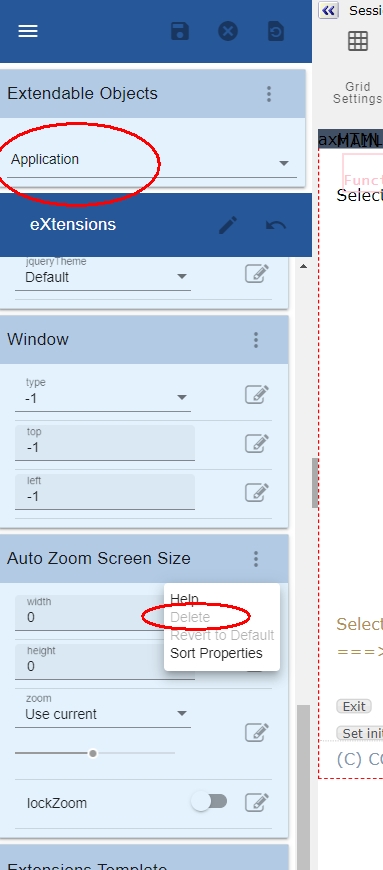
axapps1.jpg
axapps1.jpg (102.33 KiB) Viewed 9690 times
I was able to clic "Revert to Default" once, but "Delete" was never available.
I removed manually this part of the code in that file

Code: Select all

{"clsid":"axappscrsz","width":{"v":1920},"height":{"v":3000},"zo
om":{"v":100}}
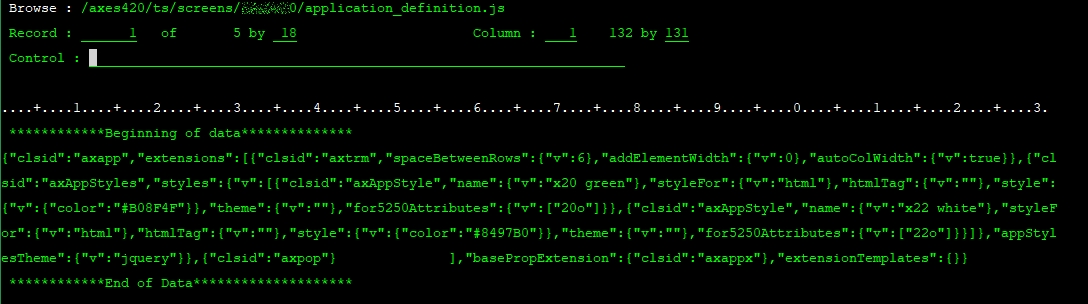
axapps2.jpg
axapps2.jpg (167.21 KiB) Viewed 9690 times
from application_definition.js file in the project folder, but the extension and the popup message "Not allowed to add more than 1 axappscrsz extension" still shows in aXes even after running the browser in private mode (to avoid cache stuff).

Maybe this has to do with the problem. Any idea how to remove this? Does your aXes show the "Auto Zoom Screen Size" extension in Application or just in Screen?

thank you
Fairdinkum
Posts: 128
Joined: 24 Jul 2017, 17:02

Re: axScreenSize, 1920x3000, how to get scrollbar?

Post by Fairdinkum »

Hi Dino,

The message appears here as well if adding the extension into the Application (or Screen) level more than one. You might want to add the extension into the "Screen" level instead of the Application level for testing.
Image 1541.png
Image 1541.png (24.26 KiB) Viewed 9688 times


Regards,
Hide
User avatar
Dino
Posts: 88
Joined: 19 May 2017, 08:29

Re: axScreenSize, 1920x3000, how to get scrollbar?

Post by Dino »

Will try in the screen once I can remove it from the Application level...
any idea how to remove it from the application level?
Fairdinkum
Posts: 128
Joined: 24 Jul 2017, 17:02

Re: axScreenSize, 1920x3000, how to get scrollbar?

Post by Fairdinkum »

Hi Dino,

It happens here as well. It seems "Auto Zoom Screen Size" can't be removed from Application. However, I confirmed that "Revert to Default" reverts its properties to default settings.
Image 1543.png
Image 1543.png (25.63 KiB) Viewed 9670 times

And if the properties of "Auto Zoom Screen Size" in Application level are default values, "Revert to Default" is desabled. So if your settings are something like the follwoing, you might want to add "Auto Zoom Screen Size" into Screen level.
axapps1.jpg
axapps1.jpg (102.33 KiB) Viewed 9670 times

FYI, I just changed the extension's properties like below (without adding the extension into Screen), it also works as expected. (X/Y scroll bars appeared.)
Image 1542.png
Image 1542.png (81.58 KiB) Viewed 9670 times
HTH!

Regards,
Hide
Post Reply