Page 1 of 2
Library list for tables
Posted: 18 Jul 2023, 00:23
by Fre_Vdh
Hi,
Is it possible to use the library list that the user gets when logging on to fetch the data for static/dynamic tables?
I already tried something by adding two fields in USERENV: companyLib and dataLib.
In our case, most of the data comes from 'BRSTDATA' library, but sometimes also from 'BRSTDATAAL'.
But if, for example, a Suisse user is logged on it's 'CHSTDATA' and 'CHSTDATACH'...
Could these variables be used like this?
-- ================================================================================
-- ACMA
-- ================================================================================
DefineObjectInstance {
className = "StaticTable",
name = "ACMA",
source = "sql",
selectSQLcommand = "acacnr, acacnm from :dataLib.acmas0 where ...",
resultColumnNames = {"value","text"},
};
and
-- ================================================================================
-- StukOpsturenNL
-- ================================================================================
DefineObjectInstance {
className = "StaticTable",
name = "StukOpsturenNL",
source = "sql",
selectSQLcommand = "t2item, t2omsc from :companyLib.tabel2 where ....",
resultColumnNames = {"value","text"},
};
Kind regards,
Frederik
Re: Library list for tables
Posted: 19 Jul 2023, 06:01
by Dino
W3 or JSM? solution is different for each
Re: Library list for tables
Posted: 19 Jul 2023, 16:12
by Fre_Vdh
JSM
Re: Library list for tables
Posted: 21 Jul 2023, 00:42
by Dino
Hi,
ok, for JSM:
- The job that access the data in the dynamic list is running under their own user, axes for example, not under the same job that the user is running. so you cannot capture the library list of the user in that way.
- But you can capture the user name at login time and
- assign a library based on the user name and
to do that, the first step will be to capture the user. you can do that modifying the userenv adding a routine like this:
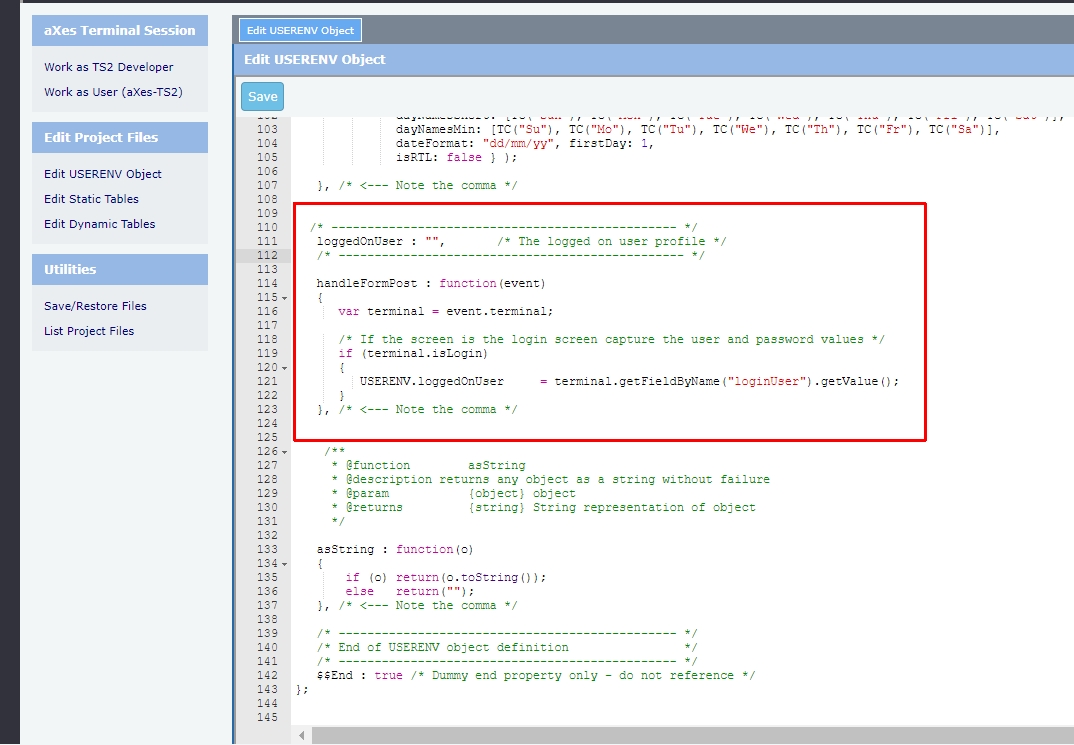
- axesuserdynamic01.jpg (242.67 KiB) Viewed 38355 times
Code: Select all
  /* ------------------------------------------------ */
   loggedOnUser : "",       /* The logged on user profile */
   /* ------------------------------------------------ */

   handleFormPost : function(event)
   {
      var terminal = event.terminal;

      /* If the screen is the login screen capture the user and password values */
      if (terminal.isLogin)
      {
         USERENV.loggedOnUser     = terminal.getFieldByName("loginUser").getValue();
      }
   }, /* <--- Note the comma */
Then open your project, go to Extendable Objects, Application, onApplicationStart add this code:
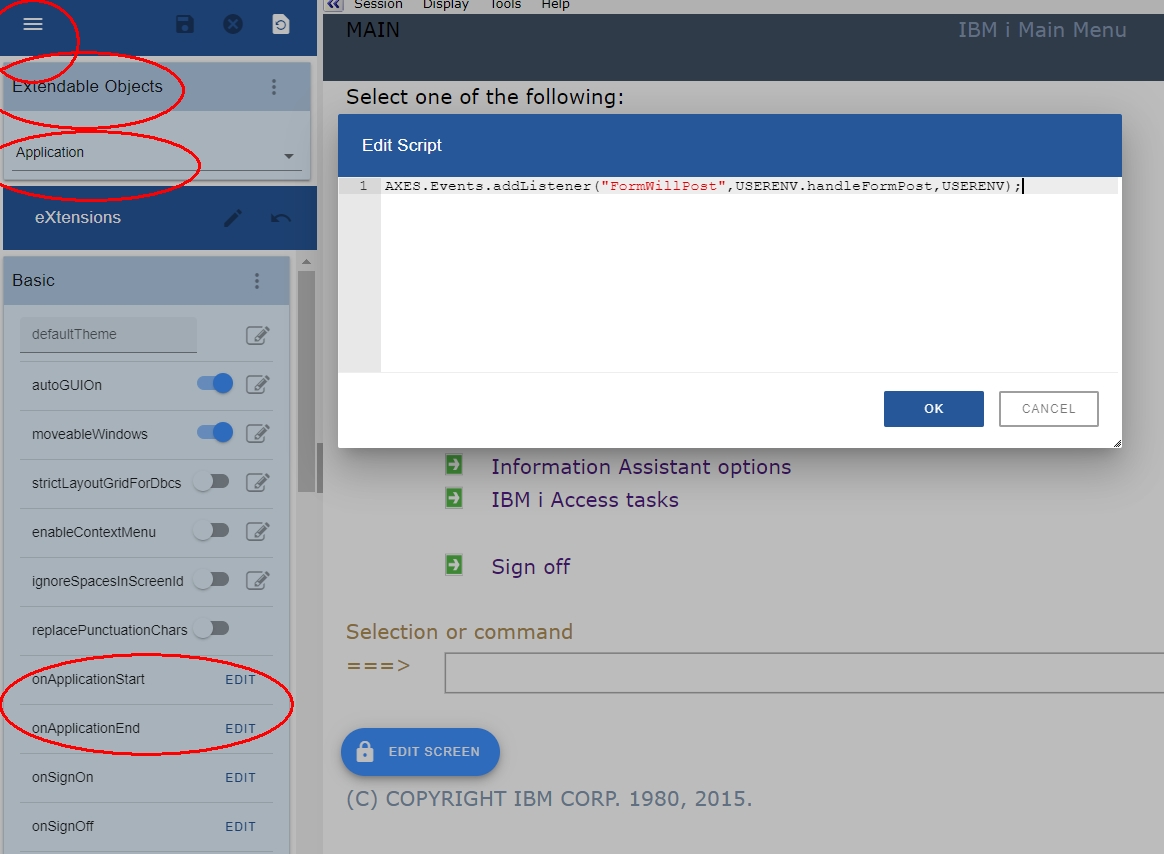
- axesuserdynamic02.jpg (205.03 KiB) Viewed 38355 times
Code: Select all
AXES.Events.addListener("FormWillPost",USERENV.handleFormPost,USERENV);
and this one for onApplicationEnd event:
Code: Select all
AXES.Events.removeListener("FormWillPost",USERENV.handleFormPost);
with this, if you were to add an script like this in your code, you should be able to see the user:
Code: Select all
alert("User=" + USERENV.loggedOnUser);
second step in next post.
Re: Library list for tables
Posted: 21 Jul 2023, 06:15
by Dino
1) Enable this settings as indicated here:
https://axesdocs.lansa.com.au/index.php ... -documents
for example in the httpd.xml in your axes jsm folder in the ifs:
Code: Select all
/axes421jsm/jsm/instance/system/httpd.xml
look for the section that says uri extservice_2.lua and change the readonly and setchema parameters:
before
Code: Select all
<match class="com.axes.mobile.service.HTTPServiceAxesService" trace="false" uri="/agi/lua5/extservice_2.lua">
....
    <parameter name="database.allow.readonly" value="true"/>
    <parameter name="database.allow.setschema" value="false"/>
....
after
Code: Select all
<match class="com.axes.mobile.service.HTTPServiceAxesService" trace="false" uri="/agi/lua5/extservice_2.lua">
....
    <parameter name="database.allow.readonly" value="false"/>
    <parameter name="database.allow.setschema" value="true"/>
....
and for the section extservice_7.lua
before
Code: Select all
<match class="com.axes.mobile.service.HTTPServiceAxesService" trace="false" uri="/agi/lua5/extservice_7.lua">
...
   <parameter name="database.allow.readonly" value="true"/>
   <parameter name="database.allow.setschema" value="false"/>
...
after
Code: Select all
<match class="com.axes.mobile.service.HTTPServiceAxesService" trace="false" uri="/agi/lua5/extservice_7.lua">
...
   <parameter name="database.allow.readonly" value="false"/>
   <parameter name="database.allow.setschema" value="true"/>
...
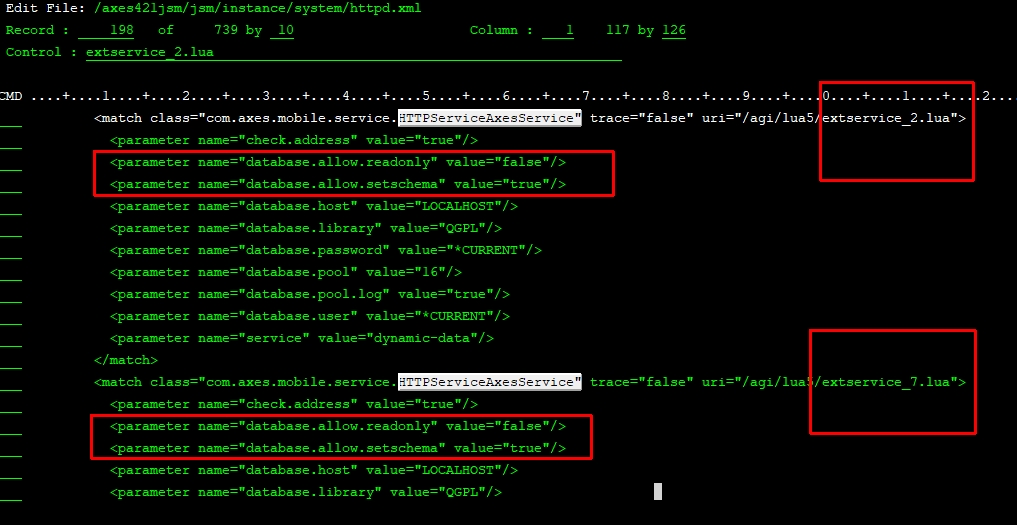
- axesuserdynamic03.jpg (239.08 KiB) Viewed 38351 times
after those changes, restart the aXesJSM subsystem.
2) create your dynamic table, notice that you dont indicate library in aXesJSM, for example:
Code: Select all
DefineObjectInstance {

      className          = "DynamicTable",
      name               = "AllDepartments",
      source             = "sql",
      selectSQLcommand   = "XHRDEPCDE,XHRDEPNME from XHRDEPT",
      resultColumnNames  = { "value", "text" },

    };
3) in your project (after adding the dynamic table, restart the project), then for example, in the onSignOn of the Application, decide what library to use. Note that you can use more than one library, I am using just dftSQLDataLibrary in this example. Also you can make your logic as complicated as needed to decide the library, based in name of the user or part of it, or maybe retrieving more information from the user, etc.
So this for onSignon:
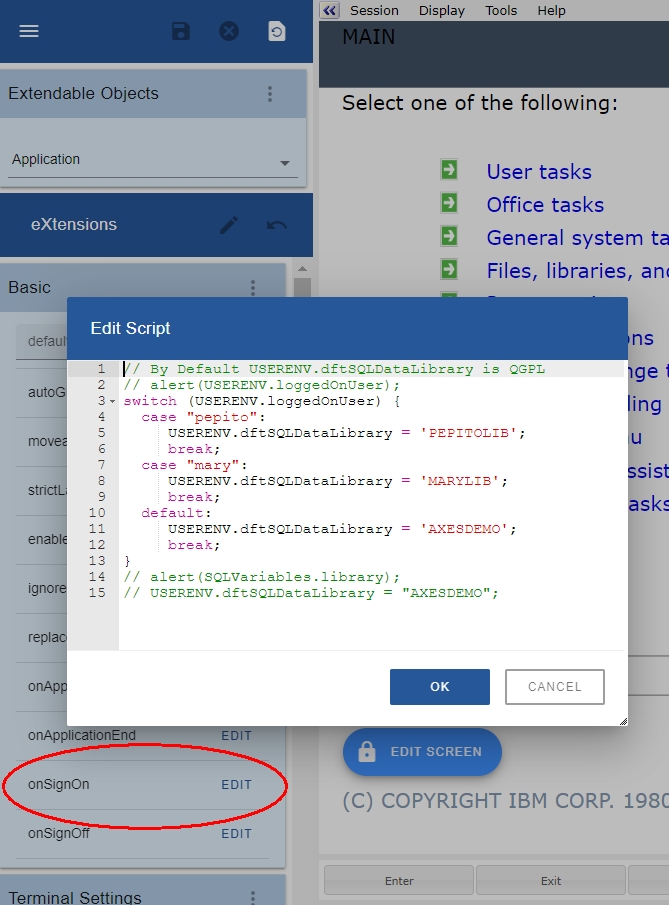
- axesuserdynamic04.jpg (226.31 KiB) Viewed 38351 times
Code: Select all
// By Default USERENV.dftSQLDataLibrary is QGPL
// alert(USERENV.loggedOnUser);
switch (USERENV.loggedOnUser) {
  case "pepito":
     USERENV.dftSQLDataLibrary = 'PEPITOLIB';
     break;
  case "mary":
     USERENV.dftSQLDataLibrary = 'MARYLIB';
     break;
  default:
     USERENV.dftSQLDataLibrary = 'AXESDEMO';
     break;
}
// alert(SQLVariables.library);
// USERENV.dftSQLDataLibrary = "AXESDEMO";
and finally, in any screen, add your dropdown, set it to:
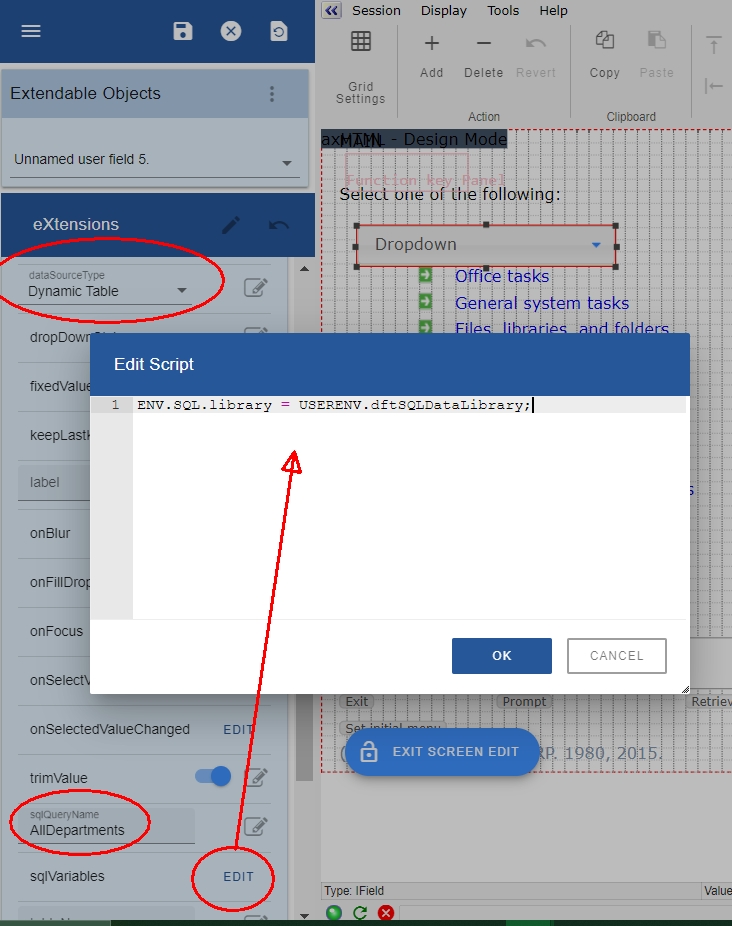
- axesuserdynamic05.jpg (251.43 KiB) Viewed 38351 times
Code: Select all
dataSourceType: Dynamic
sqlQueryName: AllDepartments
sqlVariables: ENV.SQL.library = USERENV.dftSQLDataLibrary;
that is all.
Re: Library list for tables
Posted: 16 Aug 2023, 23:47
by Fre_Vdh
Hi Dino,
Thanks for the info, if this would have been in W3, the job to access the data in the dynamic lists would have been running under the user that's logged on?
Is it possible to switch from JSM to W3? Or what are the differences between these two?
Kind regards,
Frederik
Re: Library list for tables
Posted: 17 Aug 2023, 21:25
by Dino
It will be the same case in w3.
Just the instructions to do the steps indicated are a bit different.
For most part you can switch a project between w3 and jsm, you can have both modes running side by side, no problem.
Technical differences I don't know that much internally but jsm is the future.
Re: Library list for tables
Posted: 17 Aug 2023, 23:09
by Fre_Vdh
Hi Dino,
Thanks for the answer!
In your example you only use dftSQLDataLibrary, but I have two different libraries from where data is read. A globalLib and a companyLib.
For that reason I can't use USERENV.dftSQLDataLibrary.
I made two variables in the USERENV object: globalLib and companyLib.
I filled in these variables on entering the application.
So for the dynamic tables I should leave out the library in the 'tables_dynamic.txt' and fill in the sqlVariable on the screen where the dynamic table is used. ENV.SQL.library = USERENV.globalLib or ENV.SQL.library = USERENV.companyLib?
But, for the static tables I found out that you can reload them by using this:
Code: Select all
var SQLVariables = { SQLVariableGlobalLib : USERENV.globalLib , SQLVariableCompanyLib : USERENV.companyLib  };
TABLEMANAGER.loadStaticTables(USERENV.staticTablesFile, SQLVariables, true);
What should I put in the tables_static.txt file?
Code: Select all
-- ================================================================================
-- StukOpsturenNL
-- ================================================================================

DefineObjectInstance {

     className          = "StaticTable",
     name               = "StukOpsturenNL",
     source             = "sql",
     selectSQLcommand   = "t2item, t2omsc from SQLVariableGlobalLib.tabel2 where t2type = 'US' and t2code = 'BSA010' and t2tbap <> 'P' and t2taal = '2' order by t2omsc",
     resultColumnNames  = {"value","text"},
  };
or should I do it like this, with the ':' before the SQLVariableGlobalLib?
Code: Select all
-- ================================================================================
-- StukOpsturenNL
-- ================================================================================

DefineObjectInstance {

     className          = "StaticTable",
     name               = "StukOpsturenNL",
     source             = "sql",
     selectSQLcommand   = "t2item, t2omsc from :SQLVariableGlobalLib.tabel2 where t2type = 'US' and t2code = 'BSA010' and t2tbap <> 'P' and t2taal = '2' order by t2omsc",
     resultColumnNames  = {"value","text"},
  };
I tried it both ways and I got this for every table:
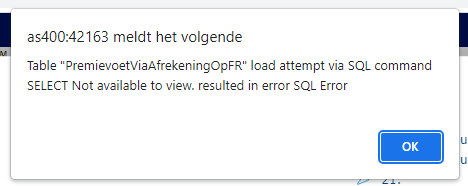
- static.png (8.2 KiB) Viewed 38195 times
Re: Library list for tables
Posted: 18 Aug 2023, 12:31
by tim mcentee
The difference between W3 & JSM is that W3 uses lua scripts to access the server while jsm uses Integrator and java.
When talking to Alec before he left he said that that it was easier for hackers to hijack the lua scripts and get access to your server. Which is why he rewrote it using Integrator.
My knowledge ends there. But on that note I would recommend that you use the JSM version.
Re: Library list for tables
Posted: 21 Aug 2023, 17:09
by Fre_Vdh
Hi,
Is there a way to get the SQL command that's been executed and that resulted in the SQL Error?
Or can I find a better description of the error somewhere?
Kind regards,
Frederik