Page 1 of 1
how to show error on a drop down?
Posted: 26 Jan 2023, 00:24
by gracehsu
Hello;
I have started modernizing our green screen programs with AXES, I turned some fields into drop downs and I can't figure out how to reflect the fact that the field is reverse-imaged? (e.g. showing an error)
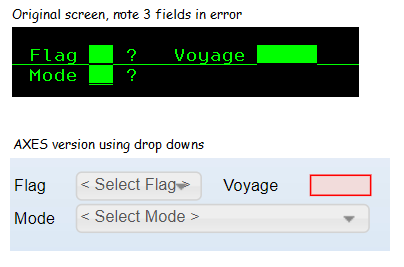
- temp.png (7.82 KiB) Viewed 9943 times
Re: how to show error on a drop down?
Posted: 27 Jan 2023, 08:00
by Dino
my knowledge in javascript is not that good, but I think the solution will go using something around the properties like this:
(I had been testing using the onSelectedValueChange property of the dropdown to put this code, a better place needs to be found as well)
Code: Select all
alert(FIELD.getProperty("style","color"));
if (FIELD.getProperty("style","color") == "white")
{
   FIELD.setProperty("dropDownStyle",{"color":"red"});
   FIELD.refresh();
}
I know the setProperty works fine, but the getProperty I am doing something wrong as I cannot retrieve the color, maybe someone here can chime about it.
I have noticed that an input field without error, have the x24i attribute for color, while is x25i for reverse, so the color presented, lets say green or white or anything else, will depend on your aXes styles assigned to them at application level.
just an idea.
https://axesdocs.lansa.com.au/index.php ... 9wZXJ0eSJd
Re: how to show error on a drop down?
Posted: 17 May 2023, 01:34
by gracehsu
figure this out while the forums were down and I'm posting the answer here in case anyone else needs it, I wrote a function in USERENV which I set as a the default for class in all of the extensions (including drop downs)
/*--------------------------------------------------------------------------------------------------------
* check if the 5250 field behind extension is in error, if so, then update css to refled that
* note: apparently, most CSS do not apply to the drop-downs/etc? Luckily if the theme includes rounded
* buttons/dropdowns, you can set the background & border to red.
*--------------------------------------------------------------------------------------------------------*/
e2eCkErr : function(FIELD) {
var X = FIELD.get5250Attribute();
var oStyle = {};
//Check to see if this field's 5250 Attribute Byte is associated with an error message
if ((X == "X25") ||(X == "X28") || (X == "X29") || (X == "X2A") || (X == "X2B")
|| (X == "X2C") || (X == "X2D") || (X == "X2E")) {
oStyle = {"border":"1px solid", "background-color":"#f2dcdb", "color":"#ff0000"};
}
return oStyle;
}, /* <--- Note the comma */
dropdown style:
ENV.returnVal = USERENV.e2eCkErr(FIELD);