Page 1 of 1
Context menu for output fields?
Posted: 15 Oct 2021, 12:10
by eduardorama
How do I enable the browser's context menu for output field?
I enabled this option in Application > Basic eXtensions
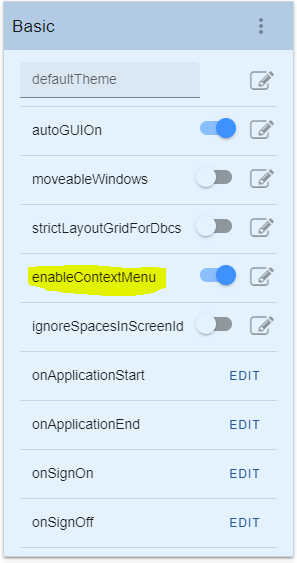
- enabled contextmenu.PNG (16.88 KiB) Viewed 9786 times
But it works only for non read-only Input and textarea.
I tried to remove the highlighted code below in
axuser.min.js but it didn't work.

- axuser.min.js line.PNG (11.78 KiB) Viewed 9786 times
I suspect that it might be somewhere in
axdev.min.js but I still can't figure it out.
Re: Context menu for output fields?
Posted: 18 Oct 2021, 15:12
by Fairdinkum
Hi eduardorama,
Try the following.
(onApplicationStart)
Code: Select all
/*
 * 右クリックメニュー(Context Menu)の有効化
 * Enable the context menu
 */
document.addEventListener('contextmenu',function(e){e.stopPropagation();},true);

- Image 1610.png (48.74 KiB) Viewed 9767 times
HTH!
Regards,
Hide
Re: Context menu for output fields?
Posted: 19 Oct 2021, 10:08
by eduardorama
Hi Fairdinkum,
Thank you, it did work.
However, when I applied it onApplicationStart, it applied as well to edit mode/edit screen.
If it's possible, we want it only to work for the users and not affecting the designer's contextmenu (add user field /revert to default).
Re: Context menu for output fields?
Posted: 19 Oct 2021, 10:28
by Fairdinkum
Hi Eduardorama,
If that's the case, try the code below.
Code: Select all
/*
 * 右クリックメニュー(Context Menu)の有効化
 * Enable the context menu
 */
if ( !AXES.isDeveloper() ){
    document.addEventListener('contextmenu',function(e){e.stopPropagation();},true);
}
You might want to clear the cache before this testing.
I hope this will help.
Regards,
Hide
Re: Context menu for output fields?
Posted: 19 Oct 2021, 10:45
by eduardorama
Hi Fairdinkum,
That did the trick.
Thank you so much for the help.