Page 1 of 1
Print Screen in TS2
Posted: 09 Feb 2018, 16:12
by Fairdinkum
Hi,
This way allows users to print screens even if the session is in use of TS2.
Sequence:
1) Click a printScreen button and then write out the 5250 screen data in text onto window screen launched by window.open().
2) Right after (1) is done, printer dialog will be opened by window.print().
How to implement:
1) Unzip printScreenInUSERENV.zip and copy the content into your USERENV.
2) Unzip onApplicationStart.zip and copy the content into your onApplicationStart property.
3) You will see something like this.
https://drive.google.com/open?id=1V5PMK ... 9ySA575Oa9
HTH.
Best Regards,
Hidekazu Tanaka
Re: Print Screen in TS2
Posted: 17 Jan 2023, 02:40
by Dino
Thank you, I just tested this, still working in aXes 4.2.1
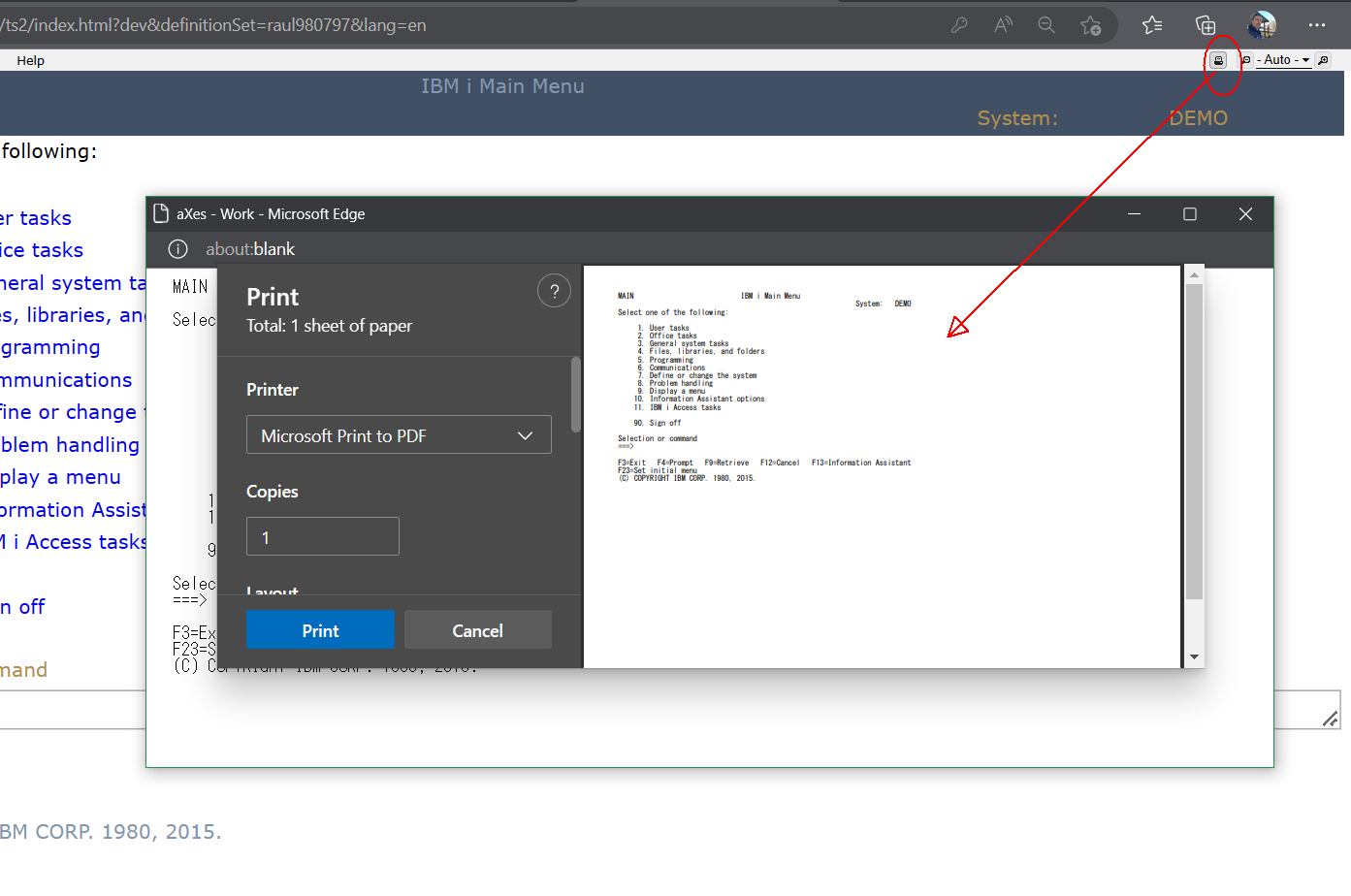
- axesprintscreen.png (100.09 KiB) Viewed 52929 times
just had to remove some extra characters in the comments to avoid javascript errors due to translation so the updated userenv extra code is this:
Code: Select all
   /* ----------------------------------------------- */
   /* Functions for Print Screen                      */
   /* Name space: printScreen                         */
   /* ----------------------------------------------- */

   printScreen :
   {
      // Window object
      win : "",

      run : function (){
        USERENV.printScreen.openWindow(
          USERENV.printScreen.win,
          USERENV.printScreen.getScreenData(),
          USERENV.printScreen.printScreen
        );
      },


      /* Open printer dialogue Window object */
      printScreen : function ( w ){
        w.print();
        w.close();
      },

      /* Open Window Callback function */
      openWindow : function ( w, dspstr, callback ){

        // Open window
        w = window.open( "", "printScreen", "scrollbars=yes,resizable=yes,width=924,height=400" );
        w.document.open();

        w.document.write("<html>");
        w.document.write("<head>");
        w.document.write("<title>aXes</title>");
        w.document.write("</head>");
        w.document.write("<body>");
        w.document.write("<pre style='margin:0;padding:0;font-family:MS Gothic;font-size:14px;'>");
        for ( var i=0; i < 27; i++ ){
          w.document.write( dspstr[i] + "<br>" );
        }
        w.document.write("</pre>");
        w.document.write("</body>");
        w.document.write("</html>");
        w.document.close();
        callback(w);
      },

      /* Get current screen text data */
      getScreenData : function (){
        var ns = USERENV.printScreen;
        var lineBuf = "";
        var ary = [];
        for ( var i=1; i<=27; i++ ){
          if ( AXES.currentForm.getElementsByRow(i) ){
            var aScreenElements = AXES.currentForm.getElementsByRow(i);
            for ( var key in aScreenElements ) {
              var oElem = aScreenElements[key];

              lineBuf = lineBuf.replace(/\xA0/g," ");
              lineBuf = lineBuf.replace(/\s+$/,"");
              var len = ns.countLength( lineBuf );

              if ( oElem.getValue().trim() !== "" ){
                if ( len < oElem.column ){
                  for ( var j=0; j<(oElem.column - len ); j++ ){
                    lineBuf += " ";
                  }
                  lineBuf += oElem.getValue();
                }else if ( len >= oElem.column ){
                  // NOP
                }else{
                  lineBuf += oElem.getValue();
                }
              }
            }
          }else{
            lineBuf = "";
          }
          //push
          ary.push( lineBuf );
          lineBuf = "";
        }
        return( ary );
      },

      /* Count byte length  */
      countLength : function ( str ) {
        var r = 0;
        for (var i = 0; i < str.length; i++) {
          var c = str.charCodeAt(i);
          /*
           * Shift_JIS: 0x0 0x80, 0xa0, 0xa1 0xdf, 0xfd 0xff
           * Unicode: 0x0 0x80, 0xf8f0, 0xff61 0xff9f, 0xf8f1 0xf8f3
           */
          if ( (c >= 0x0 && c < 0x81) || (c == 0xf8f0) || (c >= 0xff61 && c < 0xffa0) || (c >= 0xf8f1 && c < 0xf8f4)) {
            r += 1;
          } else {
            r += 2;
          }
        }
        return( r );
      },
   },
and this for the ApplicationStart:
Code: Select all
$("#ax-terminal-zoomout").before("<span id='printScreen' " +
                                "title='(PrintScreen)' " +
                                "class='ui-icon ui-icon-print ui-state-default ui-corner-all' " +
                                "style='float:right;margin-left:10px;margin-right:10px;' " +
                                "onMouseOver='this.classList.add(\"ui-state-hover\")' " +
                                "onMouseOut='this.classList.remove(\"ui-state-hover\")' " +
                                "onClick='USERENV.printScreen.run()'" +
                                "></span>");
Re: Print Screen in TS2
Posted: 17 Jan 2023, 10:02
by Fairdinkum
Hi Dino,
Thanks for testing it. I did double-check and confirmed it works in v4.2.1. Thanks.
Regards,
Hide
Re: Print Screen in TS2
Posted: 17 Jan 2023, 10:12
by Fairdinkum
Hi
I would like to share sample codes for the Material Design with you all.
USERENV
Code: Select all
    printScreen : function() {
        // Retrieve the current zoom setting
        var zoomSetting = AXES.Layout.getZoomSetting();
        var z           = AXES.Layout.getZoom();
        console.log("z="+JSON.stringify(z)+", zoomSetting="+zoomSetting);
        AXES.Layout.setZoom(1.0);
        window.print();
        // Return the zoom setting
        if ( zoomSetting !== "" ){
          AXES.Layout.setZoom( zoomSetting );
        }else{
          AXES.Layout.setZoom( z / 100 );
        }
    },
onSignOn
Code: Select all
$("#printScreen").remove();
$("#ax-terminal-zoomout").before("<span id='printScreen' " +
                                "title='Screen Print' " +
                                "class='md-icon-button material-icons' " +
                                "style='float:right;margin-left:10px;margin-right:10px;' " +
                                "onClick='USERENV.printScreen()'" +
                                ">print</span>");

- image.png (1.43 KiB) Viewed 52922 times
Click on the printer icon on the tool bar, then you will get the same results as the prevous posts on your Material Design project.
Hope this helps!
Regards,
Hide