Page 1 of 1
How to not move when double-clicking
Posted: 29 Jun 2022, 15:58
by sohashi
Hi,
Double-click on the aXes screen to go to the next page.
I am looking for a way to not go to the next page when I double click.
Is there any way to disable the move when double clicking?
Would changing as400keymap.xml help?
Regards
Shumpei
Re: How to not move when double-clicking
Posted: 30 Jun 2022, 01:14
by Dino
Hi Shumpei
I cannot use double click to go to next page...
where are you using the double click?
in a datatable in aXes?
just any empty space?
in a button?
regards
Re: How to not move when double-clicking
Posted: 19 Jul 2022, 10:13
by sohashi
Hi Dino
Sorry for the late reply.
I found a solution to the problem.
The solution is to set AIDKeyOnDoubleClick to blank.
Thank you very much.
Re: How to not move when double-clicking
Posted: 18 Apr 2023, 09:46
by Dino
Just to add one more thing here, as this is default visualization extension.
If you want to do have this change as the default for every input component without having to modify each screen, you need to make the change at application level, extensions template.
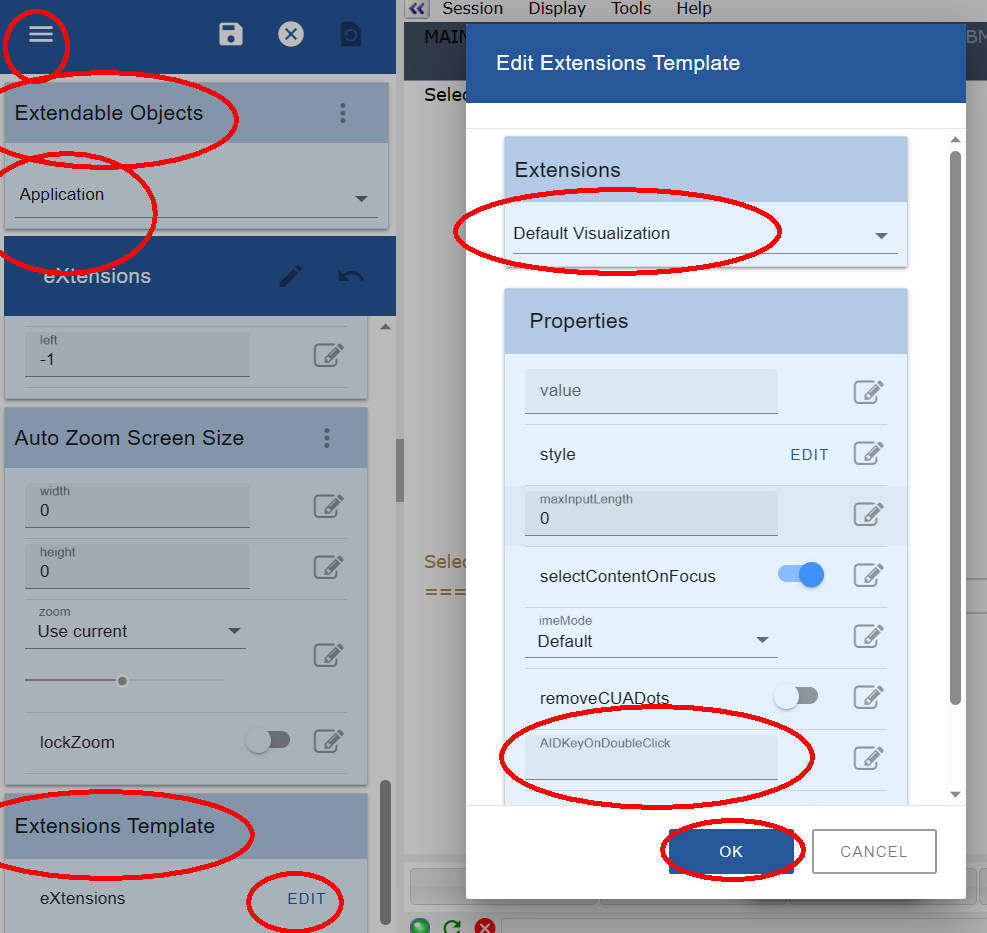
- AIDKeyOnDoubleClick.png (90.08 KiB) Viewed 5650 times