Use this Forum to post your “How to …” questions about your use of aXes. This is not a technical support forum. Both the aXes Support Team at LANSA and other aXes customers may answer your questions. LANSA cannot guarantee the accuracy of any information posted by customers.
I'm experiencing troubles with the CTEXT() translating funtcion, when trying to translate some french characters.
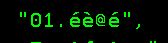
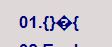
Here is an example:
image 1 : characters expected
image 2 : characters I can see as result
I assume this is related to my ccsid configurations and tried different configurations, without success.
Here is some informations about my ccsid configuration: AXES user profile: ccsid 37 HostCCSID (defined in aXesTS.conf): ccsid 1147 (France) IFS file containing translations : ccsid 819
A this time I'm looking at the ccsidoverride option in /AXES/configs/aXesTS.conf , but I' m not sure how to use it.
My other assumption is that the problem comes from the way I write into the Ifs file containing the translations, not sure of it.
Did you download the lang file "Texts_Cust_fr.txt" from IBMi, edit it with UTF-8 encoding on PC, and upload/overrite it? (Down/uploading transaction should be FTP binary mode.) If not, I would recommend you to do this instead. It would be easier than editing on IBMi considerring its CCSID.
You are right my problem was in the way I write data to the file: using the method you describe (editing UTF8 + Ftp) it works well with all specific characters.