Page 1 of 1
adding external fonts
Posted: 20 Oct 2018, 02:05
by safalpiya
Hi,
Axes developer tool provides a limited number of default fonts.
Can we add external fonts on developer tools? And if we can how can we do it?
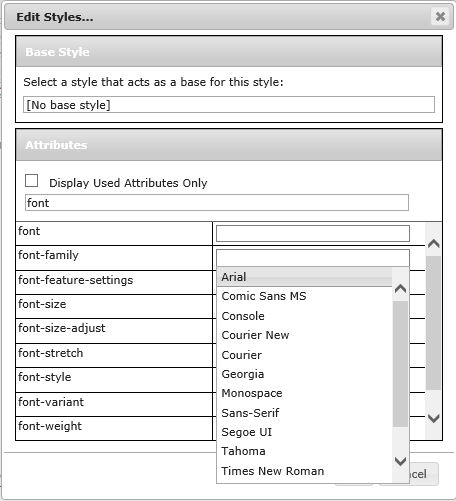
- fonts.JPG (47.4 KiB) Viewed 13720 times
Regards,
Safal Piya
Re: adding external fonts
Posted: 01 Nov 2018, 13:29
by tim mcentee
Hi Safal,
I think the drop down that you are seeing for font-face is remembered values that your browser has stored. I can't find a place where the font can be prompted otherwise.
There are 5 font-families that you tend you use with the web. This is a way of guaranteeing that most users will have the font installed on their device.
If you need an extra font, then you must have it installed somewhere, ie on the google font server or directly on the IFS in the aXes paths.
The css to load the font is then added into a file called udc.css located in /axes/ts/ts2/css. If the file doesn't exist then create it and give it the *public *R & axes owner etc.
@font-face {
font-family: 'MyWebFont';
src: url('webfont.eot'); /* IE9 Compat Modes */
src: url('webfont.eot?#iefix') format('embedded-opentype'), /* IE6-IE8 */
url('webfont.woff') format('woff'), /* Modern Browsers */
url('webfont.ttf') format('truetype'), /* Safari, Android, iOS */
url('webfont.svg#svgFontName') format('svg'); /* Legacy iOS */
}
Tim
Re: adding external fonts
Posted: 02 Nov 2018, 04:39
by safalpiya
Hi,
This is the udc.css content:
@font-face {
font-family: 'Roboto';
src: url('RobotoMono-Regular.ttf') format('truetype');
}
and the file RobotoMono-Regular.ttf is in the same folder(/ts/ts2/css)
But the font doesn't show up in the developer tool.
Thanks.
Re: adding external fonts
Posted: 05 Nov 2018, 08:57
by tim mcentee
Try
src: url('/ts/ts2/cssRobotoMono-Regular.ttf') format('truetype');
Under developer tools use the console tab to see if the udc.css file is being loaded ok and also if the font is being recognised. It will give an error if not.
NOTE: .ttf files are used for Safari, Android, iOS. If you need the font to work on a desktop you should also load the .woff file.
Then type your font face roboto directly into the fontface css entry field. Don't worry about the drop down.
Tim
Re: adding external fonts
Posted: 13 Feb 2019, 03:08
by safalpiya
Still Not working.